Assigning IPv6 to Docker Containers
Updating the Docker configuration
First enable IPv6 in Docker's configuration file at /etc/docker/daemon.json:
json
{
  "ipv6": true,
  "fixed-cidr-v6": "fd00::/80"
}
Click the IPv6 configuration on the Docker interface to assign IPv6 addresses.
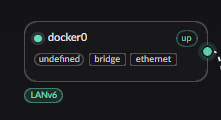
Compose configuration
For a Compose file, define the network as follows. Pay attention to three points:
- Set
com.docker.network.bridge.name. - When the interface appears, change its zone to LAN and then enable the LANv6 service.
- Set an IPv6 network. Without one, a container cannot receive an address even when the IPv6 allocation service is enabled. If the container does not run an additional DHCPv6 client, it generally receives its address through RA.
yaml
networks:
  example_network:
    name: example-network
    driver: bridge
    enable_ipv6: true
    driver_opts:
      # The host bridge name; at most 15 characters
      com.docker.network.bridge.name: br-example-v6
    ipam:
      driver: default
      config:
        - subnet: 172.30.0.0/24
          gateway: 172.30.0.1
        # This network is not used directly, but Docker requires it
        - subnet: fd00:30::/64
          gateway: fd00:30::1