Site-to-Site Networking
A site-to-site network securely connects two or more physically separate LANs over a public network. Hosts on each site can then reach the routed subnets at the other site.
The result is a private routed network spanning the sites.
Topology
Once configured, the topology looks like this:
INFO
The diagram does not show the LAN subnets on Side A or Side B. Add each site's LAN CIDR to the --advertise-routes argument in the Tailscale startup configuration so the sites can reach each other.
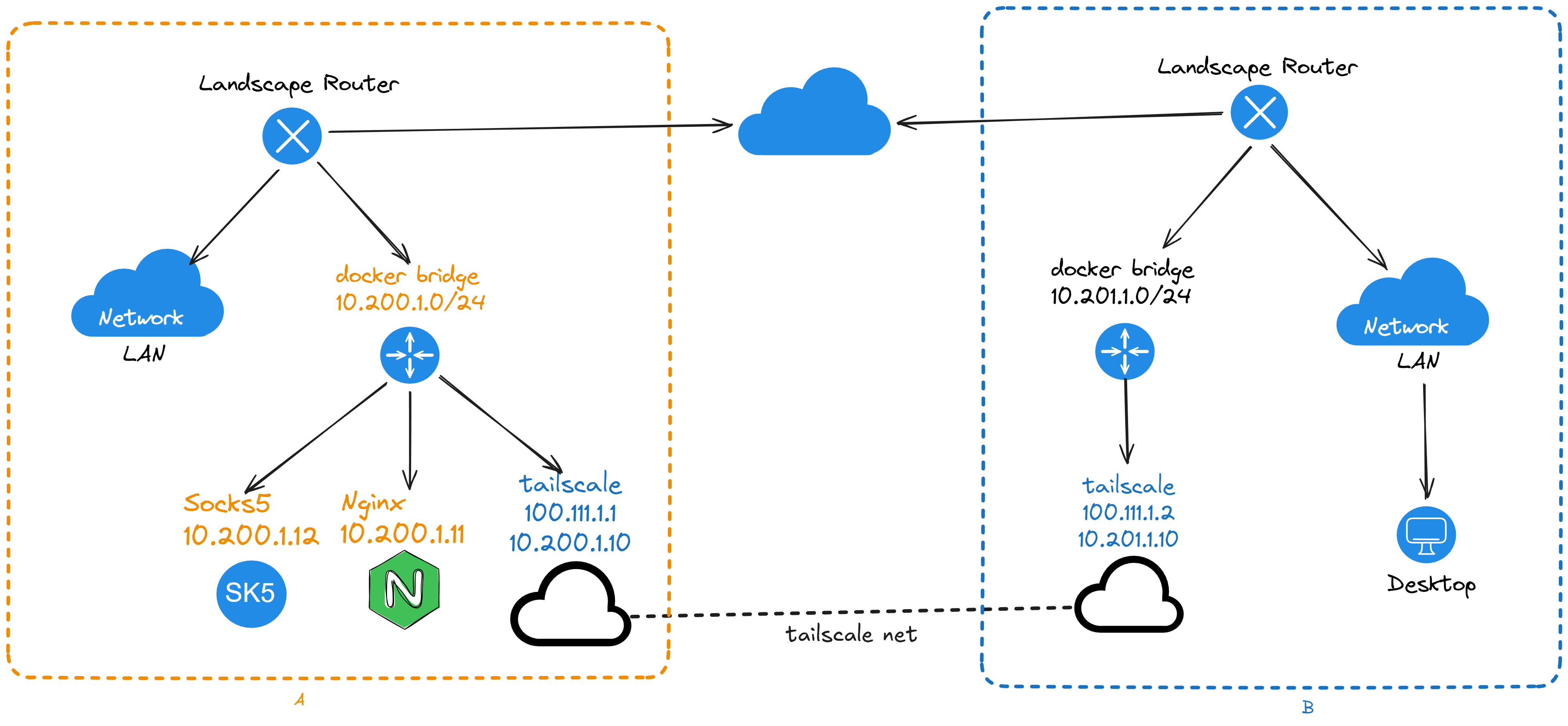
In the diagram, hosts on Side B's LAN can reach the containers on Side A through 10.200.1.0/24, regardless of the Tailscale node address.
Deployment configuration
Start with the compose file for Side A:
services:
  tailscale:
    image: ghcr.io/landscape-router/landscape-apps/tailscale:latest
    container_name: <container name>
    restart: unless-stopped
    cap_add:
      - NET_ADMIN
      - SYS_ADMIN
      - PERFMON
    devices:
      - /dev/net/tun
    environment:
      - TS_AUTHKEY=<key>
      - TS_STATE_DIR=/var/lib/tailscale
      - TS_EXTRA_ARGS=--accept-dns=false --advertise-routes=10.200.1.0/24,<the CIDR of side A's LAN, or another docker bridge CIDR> --accept-routes
      - TS_USERSPACE=false
      - TS_TAILSCALED_EXTRA_ARGS=--port=41641
    sysctls:
      net.ipv4.ip_forward: '1'
      net.ipv6.conf.all.forwarding: '1'
    volumes:
      - <persistent storage path>:/var/lib/tailscale
      # For lkit deployments, use /root/.lkit/landscape/data/unix_link/ as the host path.
      - /root/.landscape-router/unix_link/:/ld_unix_link/:ro
    networks:
      my-tailscale-bridge:
        ipv4_address: 10.200.1.10
    dns:
      - 10.200.1.1
  # Nginx for testing
  ng1:
    image: nginx
    container_name: ng1
    restart: unless-stopped
    networks:
      my-tailscale-bridge:
        ipv4_address: 10.200.1.11
    dns:
      - 10.200.1.1
  # A SOCKS5 service for testing
  sock-server:
    image: serjs/go-socks5-proxy
    container_name: sk5
    restart: unless-stopped
    environment:
      REQUIRE_AUTH: false
    networks:
      my-tailscale-bridge:
        ipv4_address: 10.200.1.12
    dns:
      - 10.200.1.1

networks:
  my-tailscale-bridge:
    driver: bridge
    driver_opts:
      # Keep the bridge name fixed so it remains stable across restarts.
      com.docker.network.bridge.name: test_tail-br0
    ipam:
      config:
        - subnet: 10.200.1.0/24
          gateway: 10.200.1.1
After starting the container, approve its routes in the Tailscale admin console, as described in Tailscale networking.
Side B's configuration:
services:
  tailscale:
    image: ghcr.io/landscape-router/landscape-apps/tailscale:latest
    container_name: <container name>
    restart: unless-stopped
    cap_add:
      - NET_ADMIN
      - SYS_ADMIN
      - PERFMON
    devices:
      - /dev/net/tun
    environment:
      - TS_AUTHKEY=<key>
      - TS_STATE_DIR=/var/lib/tailscale
      - TS_EXTRA_ARGS=--accept-dns=false --advertise-routes=<the CIDR of side B's LAN> --accept-routes
      - TS_USERSPACE=false
      - TS_TAILSCALED_EXTRA_ARGS=--port=41641
    sysctls:
      net.ipv4.ip_forward: '1'
      net.ipv6.conf.all.forwarding: '1'
    volumes:
      - <persistent storage path>:/var/lib/tailscale
      # For lkit deployments, use /root/.lkit/landscape/data/unix_link/ as the host path.
      - /root/.landscape-router/unix_link/:/ld_unix_link/:ro
    networks:
      my-tailscale-bridge:
        ipv4_address: 10.201.1.10
    dns:
      - 10.201.1.1

networks:
  my-tailscale-bridge:
    driver: bridge
    driver_opts:
      # Keep the bridge name fixed so it remains stable across restarts.
      com.docker.network.bridge.name: test_tail-br0
    ipam:
      config:
        - subnet: 10.201.1.0/24
          gateway: 10.201.1.1
After starting the container, approve its routes in the Tailscale admin console, as described in Tailscale networking.
In addition to the Tailscale routes configured in Configuring route rules, add the other site's LAN CIDR. Side B can then reach both Tailscale addresses and the Docker containers on the far side; add the container CIDR as well. 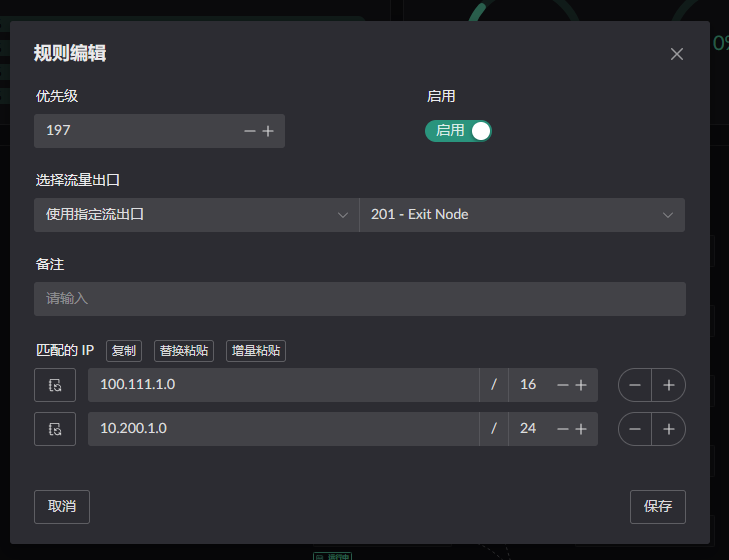
Side A likewise needs Side B's LAN CIDR.
Appendix: Using Side A as a Relay to Join Another Tailscale Network
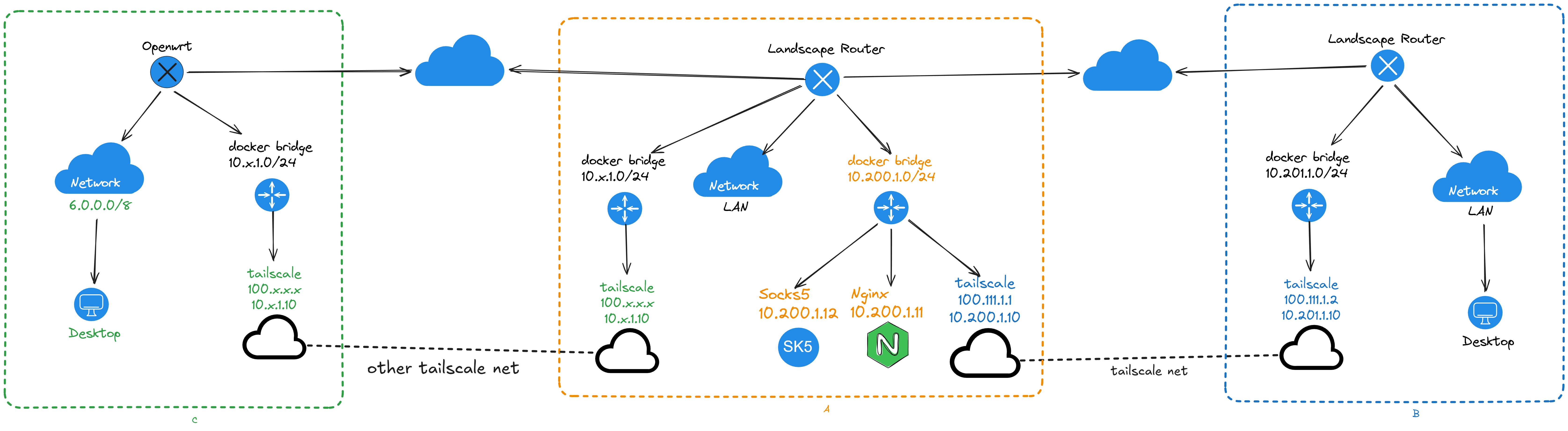
Advertise 10.200.1.0/24 on the Tailscale client connected to C as well. Side B can then reach C's LAN through Side A. The path to C can use any overlay networking tool.