DHCPv4 Server
Service configuration
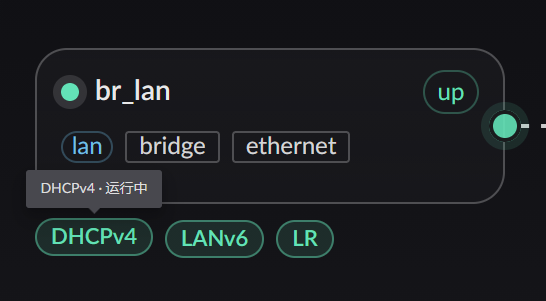
To enable the DHCP service, first assign the interface to the LAN zone, then locate the service button shown below:
Clicking the configure button shows:
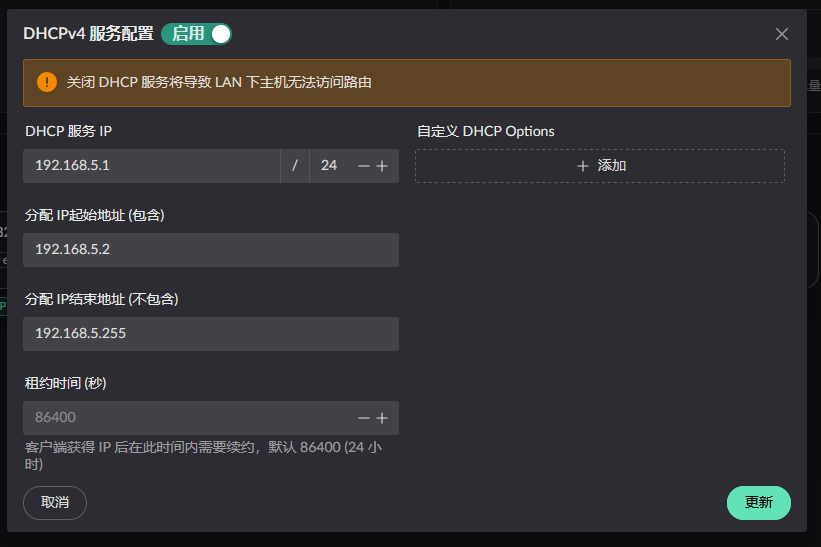
Configure the service as needed.
Assigned addresses on the LAN
You can review these in the sidebar under "Service Status" -> "DHCPv4 Service". The page shows how addresses are currently allocated, and the DHCP service runs an ARP scan once an hour across the configured subnet.
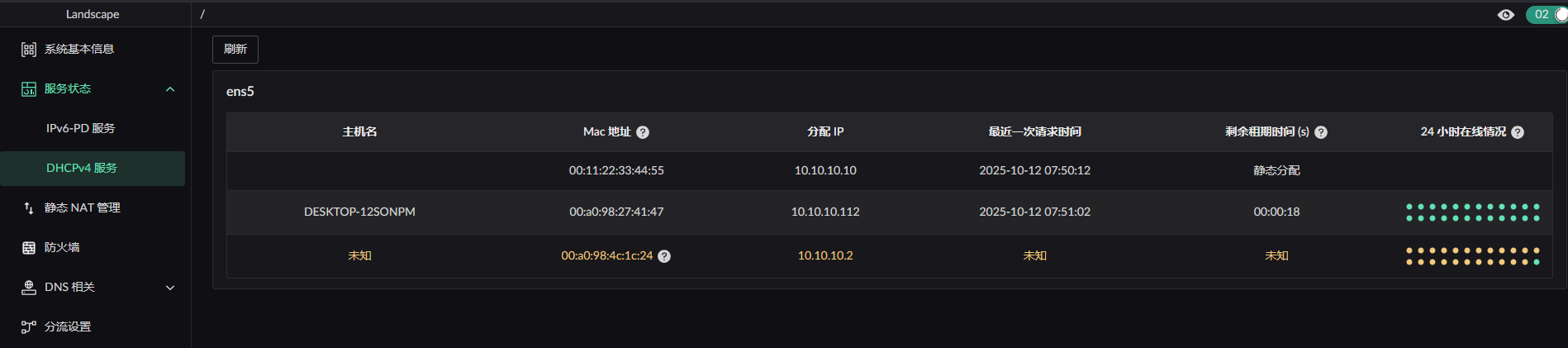
Entries in orange were not assigned during this run. They may be
- hosts that were assigned an address previously but have not made a new DHCP request yet — they will display normally once they do
- statically configured addresses
Options the server sends automatically
These options are managed by the server itself. They cannot be overridden by custom options, nor filtered out (filtering them would break DHCP itself):
| Code | Name | Value |
|---|---|---|
| 1 | Subnet Mask | derived from network_mask |
| 3 | Router | server_ip_addr |
| 6 | Domain Name Server | server_ip_addr |
| 51 | Address Lease Time | address_lease_time |
| 53 | Message Type | part of the DHCP protocol |
| 54 | Server Identifier | server_ip_addr |
In addition, 0 (Pad) and 255 (End) are reserved by the protocol and likewise unavailable.
Custom options
Beyond the table above, you can send a set of options from a whitelist. They can be set at two levels:
- Global:
custom_optionson the DHCP service configuration, applied to every client - Per device:
dhcp_custom_optionson an enrolled device, overriding the global entry with the same code
Supported options:
| Code | Variant | Type | Purpose |
|---|---|---|---|
| 66 | TFTPServerName | string | TFTP server name (iPXE network boot) |
| 67 | BootfileName | string | Boot file name (iPXE network boot) |
| 43 | VendorExtensions | hex string | Vendor-specific extensions |
| 82 | RelayAgentInformation | structured | DHCP relay agent information |
| 162 | Dnr | structured, below | Encrypted DNS discovery (RFC 9463) |
The JSON form is serde's external tagging, i.e. {"Variant": value}:
[
  { "TFTPServerName": "192.168.1.1" },
  { "BootfileName": "ipxe.kpxe" },
  { "VendorExtensions": "ff0001" },
  { "RelayAgentInformation": { "AgentCircuitId": "010203" } }
]
WARNING
- The same code must not appear twice, or config validation fails
- The data part of a single option is at most 255 bytes. Oversized data is not split into repeated options — it is rejected outright
- Custom options are injected unconditionally into every response, unlike options 15/119 which the client has to ask for in option 55
- Changes to a device's
dhcp_custom_options/dhcp_filter_optionsrequire restarting the DHCP service to take effect
Filtering options
An enrolled device can also carry dhcp_filter_options, a list of codes that should not be sent to that device. The six codes in the "sent automatically" table above, along with the protocol-reserved 0 and 255, are not allowed here.
DNR (option 162)
Tells clients where encrypted DNS (DoH) lives. Two modes are supported:
[{ "Dnr": { "mode": "local" } }][
{
"Dnr": {
"mode": "custom",
"domains": ["dns.example.com"],
"ips": ["192.168.5.1"],
"port": 6053,
"doh_path": "/dns-query"
}
}
]Where each value comes from in local mode:
| Item | Source |
|---|---|
| Domains | the domains on the API TLS certificate (those with "use for API" enabled) |
| IP | the DHCP server_ip_addr |
| Port / path | doh_listen_port / doh_http_endpoint under [dns] |
In custom mode, any field left empty falls back to the local value.
DNR can be skipped silently
DoH requires the client to validate a certificate, so this option must carry a domain. When the domain list is empty (for example, when there is no for_api certificate at all) or no usable IP remains, the option is skipped entirely while the rest of the response is returned as usual — no error is raised. If you configured DNR but cannot see option 162 in a packet capture, check the certificate domains first.