ZeroTier
Deploying ZeroTier involves the following steps:
- Configure Full Cone NAT.
- Start the ZeroTier container and create a Flow that uses it as the egress.
- Configure routing so LAN clients can reach ZeroTier addresses and subnets.
Configuring Full Cone NAT
There are two ways to configure Full Cone NAT; use either method.
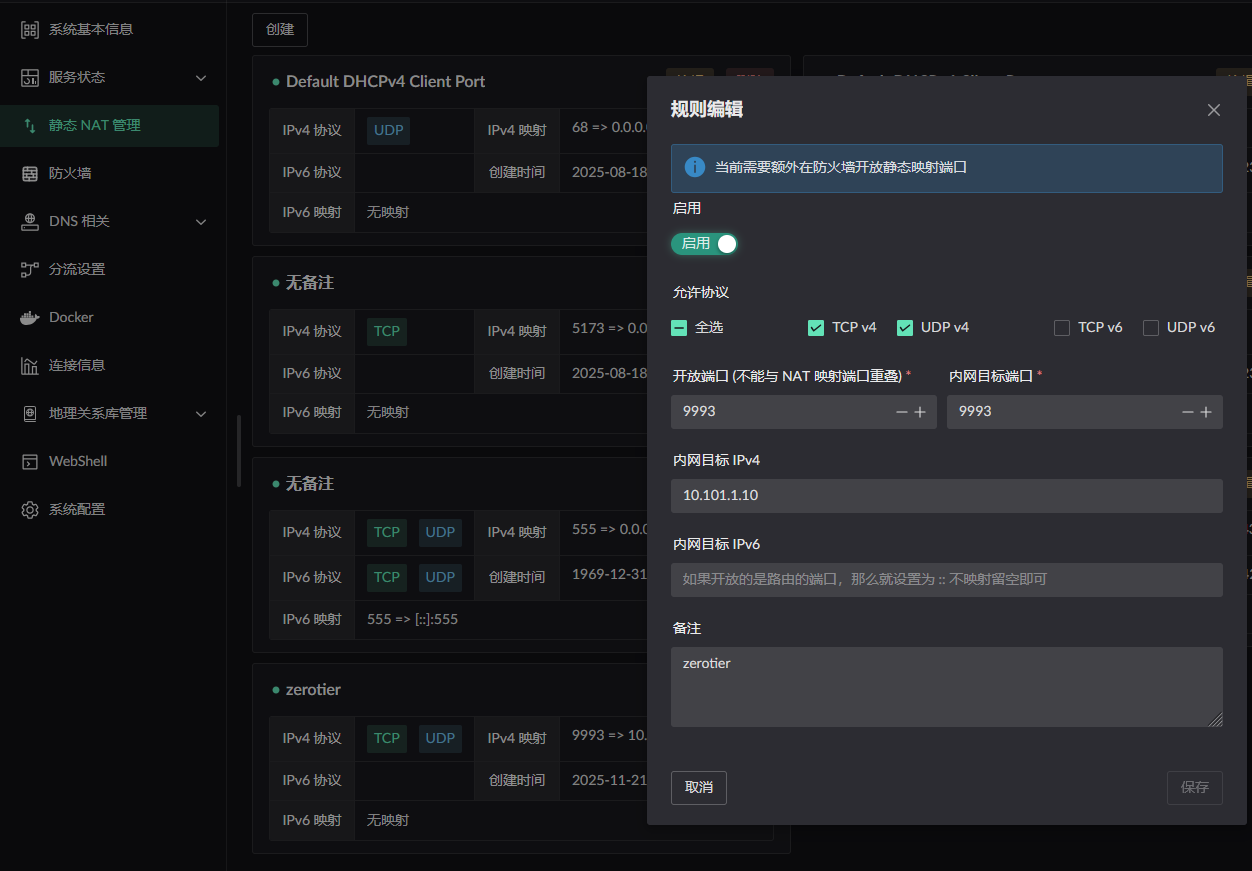
- Configure a static NAT mapping for the port ZeroTier uses (
9993). - Add the
PLANETaddresses ZeroTier uses to an IP rule and turn the Full Cone switch on.
Either method also requires the Route LAN service to be enabled on the bridge to which the container is attached. 
Static NAT configuration: the internal target port is the container port and the target IP is the container IP.
Add this under Destination IP on the default Flow, unless the container's MAC address or IP address is already the ingress of another Flow.
Copy the JSON below into the rule editor.
json[ { "t": "config", "ip": "35.208.208.49", "prefix": 32 }, { "t": "config", "ip": "103.195.103.66", "prefix": 32 }, { "t": "config", "ip": "84.17.53.155", "prefix": 32 }, { "t": "config", "ip": "185.152.67.145", "prefix": 32 }, { "t": "config", "ip": "79.127.159.187", "prefix": 32 } ]
Starting the container
WARNING
Set a fixed Docker bridge name. If Docker generates a new interface name after a restart, the LAN service cannot start correctly.
networks:
  my-zerotier-bridge:
    driver: bridge
    driver_opts:
      # Keep the bridge name fixed so it remains stable across restarts.
      com.docker.network.bridge.name: zero-br0
Start the container from the image built in the apps repository. The compose file below may be out of date; for the latest, see docker-compose.
Then start it with your own compose configuration.
services:
  zerotier:
    image: ghcr.io/landscape-router/landscape-apps/zerotier:latest
    container_name: myzero
    restart: unless-stopped
    cap_add:
      - NET_ADMIN
      - SYS_ADMIN
      - BPF
      - PERFMON
    devices:
      - /dev/net/tun
    command: ${NETWORK_ID}
    sysctls:
      net.ipv4.ip_forward: '1'
      net.ipv6.conf.all.forwarding: '1'
    volumes:
      - ${DATA_PATH}:/var/lib/zerotier-one
      # For lkit deployments, use /root/.lkit/landscape/data/unix_link/ as the host path.
      - /root/.landscape-router/unix_link/:/ld_unix_link/:ro
    networks:
      my-zerotier-bridge:
        ipv4_address: 10.101.1.10
    dns:
      - 10.101.1.1

networks:
  my-zerotier-bridge:
    driver: bridge
    driver_opts:
      # Keep the bridge name fixed so it remains stable across restarts.
      com.docker.network.bridge.name: zero-br0
    ipam:
      config:
        - subnet: 10.101.1.0/24
          gateway: 10.101.1.1
Once the container is running, verify its peers with:
docker exec <container name> zerotier-cli peers
200 peers
<ztaddr>   <ver>  <role> <lat> <link>   <lastTX> <lastRX> <path>
68bea79acf 1.15.3 LEAF     274 DIRECT   13477    13477    xxx.xxx.xxx.xxx/21049
778cde7190 -      PLANET   329 DIRECT   25175    29846    103.195.103.66/9993
cafe04eba9 -      PLANET   290 DIRECT   25175    29885    84.17.53.155/9993
cafe80ed74 -      PLANET   192 DIRECT   25175    29795    185.152.67.145/9993
cafefd6717 -      PLANET   137 DIRECT   172      25038    79.127.159.187/9993
Create a Flow that uses this container as its egress. 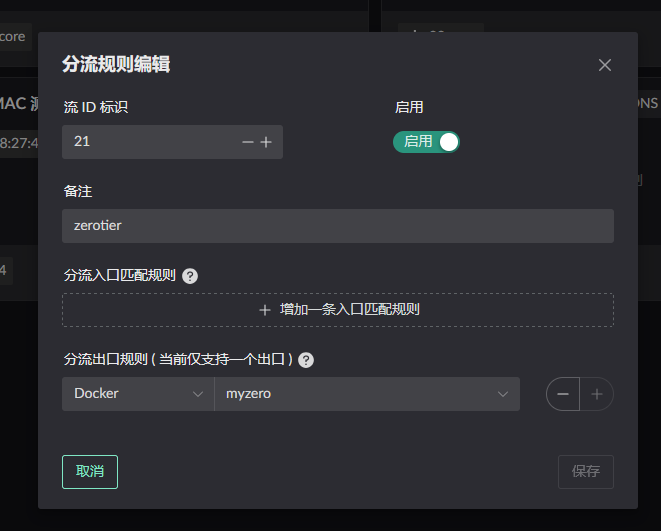
Configuring route rules
Click Destination IP on the relevant Flow to configure a rule. Only traffic matching that rule uses the Flow. 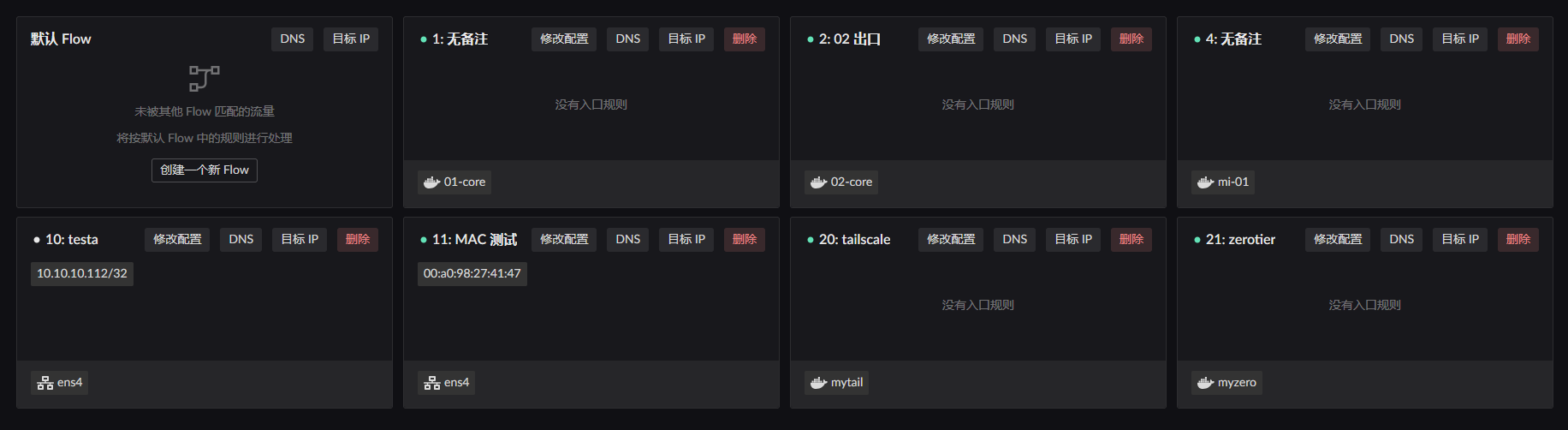
In this example, the LAN client with MAC address 00:a0:98:27:41:47 is governed by Flow 11. Configure Destination IP on Flow 11 and select Flow 21, the Flow created for the container, as the egress. 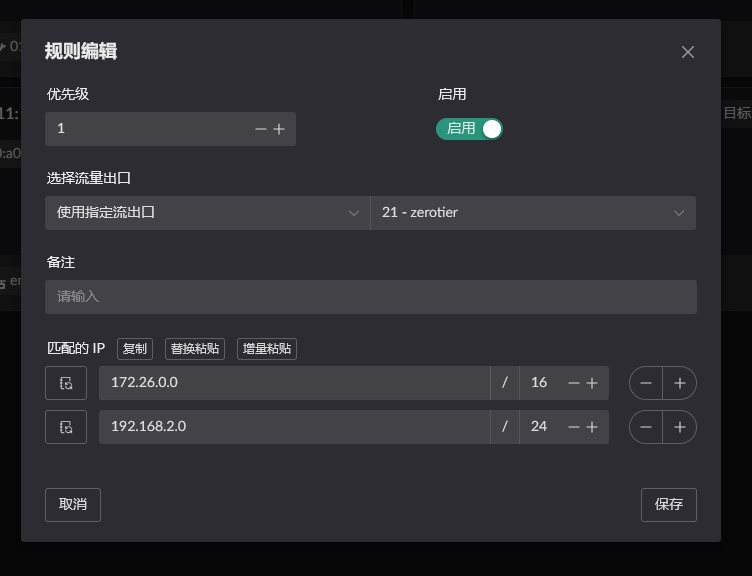
Also verify that the container has a ZeroTier interface:
docker exec <container name> ip add
...
3: zt6jy55lqy: <BROADCAST,MULTICAST,UP,LOWER_UP> mtu 2800 qdisc fq_codel state UNKNOWN group default qlen 1000
    link/ether d6:46:9c:3c:ed:45 brd ff:ff:ff:ff:ff:ff
    inet 172.26.161.171/16 brd 172.26.255.255 scope global zt6jy55lqy
       valid_lft forever preferred_lft forever
    inet6 fe80::d446:9cff:fe3c:ed45/64 scope link
       valid_lft forever preferred_lft forever
Add the internal subnet (this example uses 10.10.10.0/24) to ZeroTier and set its via field to the container IP found above (172.26.161.171). 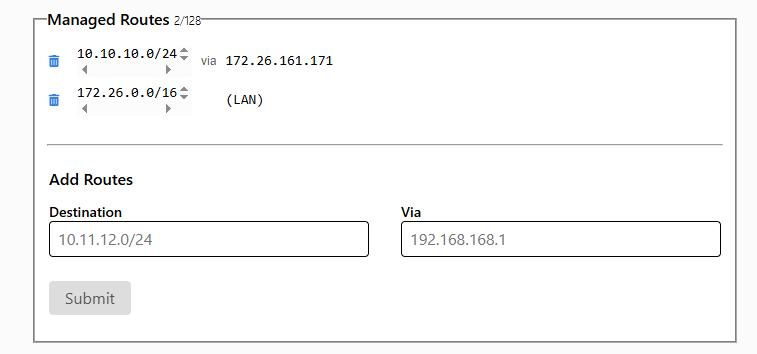
Connect from another client and verify that it can reach resources on the LAN.
Verifying the result
The devices involved:
Device 1: 172.26.172.71, aZeroTier clientnot deployed on the routerDevice 2: 172.26.161.171, theZeroTier clientdeployed on the routerDevice 3: 10.10.10.112, a host on the router's LAN
- From
Device 1, pingDevice 3; traffic passes throughDevice 2.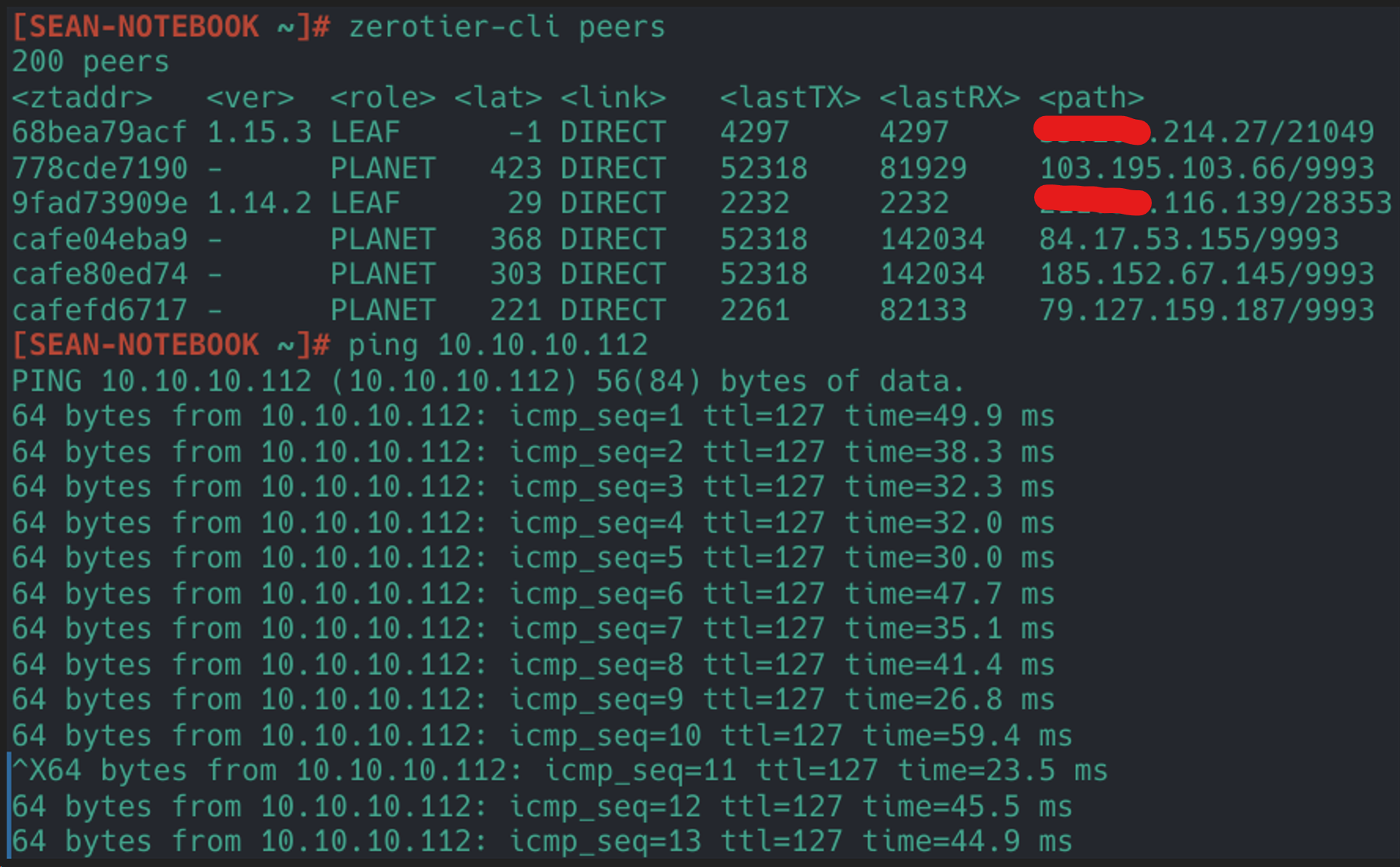
- From
Device 3, pingDevice 1; traffic passes throughDevice 2.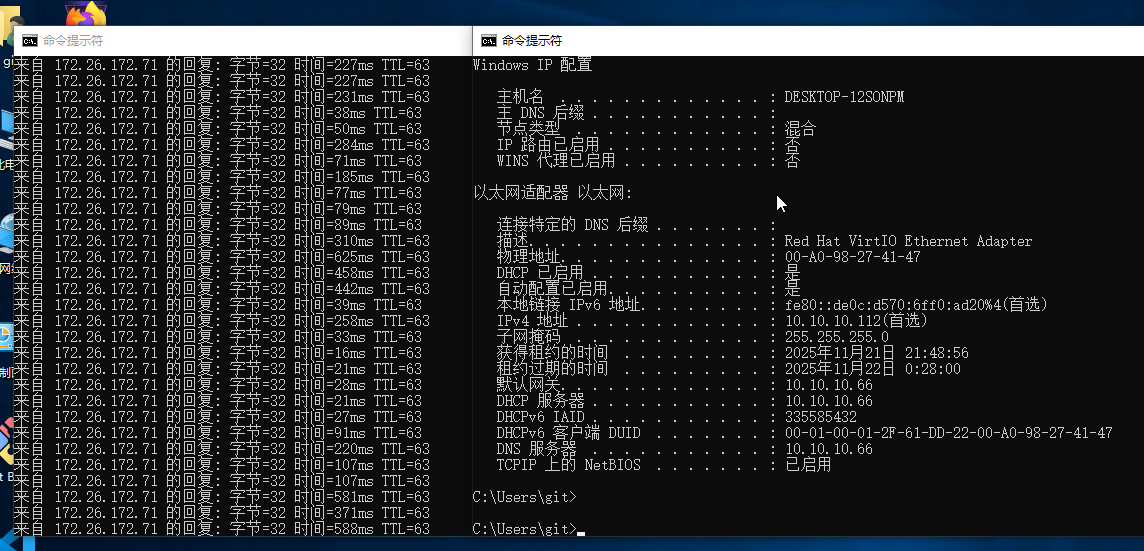
Appendix: the PLANET addresses ZeroTier uses
The IPs to put in the IP rule are whatever these domains resolve to:
root-mia-01.zerotier.com
root-tok-01.zerotier.com
root-zrh-01.zerotier.com
root-lax-01.zerotier.com