dn42
Connecting to the dn42 network involves the following steps:
- Build a container for WireGuard and BIRD 2.
- Add the BIRD 2 and WireGuard configuration files, start the container, and create a Flow that uses it as the egress.
- Configure Full Cone NAT.
- Configure routing and DNS so LAN clients can reach dn42 addresses, subnets, and domains.
Building the container
First create a Dockerfile:
# Use Alpine Linux as the base
FROM alpine:latest
RUN sed -i 's/dl-cdn.alpinelinux.org/mirrors.tuna.tsinghua.edu.cn/g' /etc/apk/repositories
RUN apk update && apk add --no-cache \
    wireguard-tools \
    bird2 \
    libgcc \
    nano \
    iptables \
    tcpdump \
    iproute2 \
    tini \
    && rm -rf /var/cache/apk/*
# Create the configuration directories
RUN mkdir -p /etc/wireguard /etc/bird
# Copy the entrypoint and configuration (created below)
COPY entrypoint.sh /entrypoint.sh
COPY redirect_pkg_handler /redirect_pkg_handler
# Make the scripts executable
RUN chmod +x /entrypoint.sh && chmod +x /redirect_pkg_handler
# Use tini as the init process so signals are handled
ENTRYPOINT ["/sbin/tini", "--", "/entrypoint.sh"]
Create entrypoint.sh in the same directory:
#!/bin/sh
set -e
echo "[redirect_pkg_handler] starting..."
/redirect_pkg_handler -m route &
# Bring up every WireGuard interface (configuration files must end in .conf)
for conf in /etc/wireguard/*.conf; do
    if [ -f "$conf" ]; then
        echo "Bringing up WireGuard interface: $conf"
        wg-quick up "$conf" || echo "Failed to bring up $conf, check the configuration"
    fi
done
# Wait for the network to be ready (IPv6 in particular)
sleep 2
# Check the WireGuard interface status
wg show
# Start the BIRD2 daemon
echo "Starting the BIRD2 routing daemon..."
exec bird -c /etc/bird/bird.conf -f
Download the musl build of redirect_pkg_handler from the Landscape releases. The directory should then contain:
tree
.
├── Dockerfile
├── redirect_pkg_handler
└── entrypoint.sh
Then build the image:
docker build -t <tag> .Starting the container
WARNING
Set a fixed Docker bridge name. If Docker generates a new interface name after a restart, the LAN service cannot start correctly.
networks:
  dn42-bridge:
    driver: bridge
    driver_opts:
      # Keep the bridge name fixed so it remains stable across restarts.
      com.docker.network.bridge.name: dn42-br0
Then start it with your own compose configuration.
services:
  dn42:
    image: <the image tag you built>
    container_name: dn42
    restart: unless-stopped
    cap_add:
      - NET_ADMIN
      - SYS_ADMIN
      - PERFMON
    sysctls:
      net.ipv4.ip_forward: '1'
      net.ipv6.conf.all.forwarding: '1'
      net.ipv4.conf.all.rp_filter: '0'
      net.ipv4.conf.default.rp_filter: '0'
    volumes:
      - /root/dn42/wireguard:/etc/wireguard
      - /root/dn42/bird:/etc/bird
      # For lkit deployments, use /root/.lkit/landscape/data/unix_link/ as the host path.
      - /root/.landscape-router/unix_link/:/ld_unix_link/:ro
    networks:
      dn42-bridge:
        ipv4_address: <an IP from the dn42 IPv4 range you registered>
        ipv6_address: <an IP from the dn42 IPv6 range you registered>

networks:
  dn42-bridge:
    driver: bridge
    enable_ipv6: true
    driver_opts:
      # Keep the bridge name fixed so it remains stable across restarts.
      com.docker.network.bridge.name: dn42-br0
    ipam:
      config:
        - subnet:
          gateway:
        - subnet:
          gateway:
Create bird.conf under /root/dn42/bird. You can start from the dn42 BIRD 2 guide and adapt it to your peers.
Create the peer's WireGuard configuration under /root/dn42/wireguard:
[Interface]
PrivateKey =
# Listen port
ListenPort =
# dn42 communication must use the official IP registered with dn42.
# Replace the example addresses with your own dn42 IPv4 and IPv6 addresses.
Address =
table = off
# Optional: add a link-local address for the BGP session
PostUp = /etc/wireguard/scripts/up.sh %i
PostDown = /etc/wireguard/scripts/down.sh %i

[Peer]
PublicKey =
# The peer's endpoint
Endpoint =
# The dn42 ranges allowed to route through this tunnel
AllowedIPs = 172.20.0.0/14, 172.31.0.0/16, fd00::/8, fe80::/64
# Pre-shared key
PresharedKey =
# Keepalive interval
PersistentKeepalive = 25
Create up.sh under /root/dn42/wireguard/scripts:
#!/bin/bash
# /etc/wireguard/scripts/up.sh
interface=$1
status=$2

ip address add <link-local address> dev $interface
iptables -t nat -A POSTROUTING -o $interface ! -s 172.16.0.0/12 -j SNAT --to-source <the docker IPv4 you set>
ip6tables -t nat -A POSTROUTING -o $interface ! -s fd00::/8 -j SNAT --to-source <the docker IPv6 you set>
And down.sh:
#!/bin/bash
# /etc/wireguard/scripts/down.sh
interface=$1
status=$2
iptables -t nat -D POSTROUTING -o $interface ! -s 172.16.0.0/12 -j SNAT --to-source <the docker IPv4 you set>
ip6tables -t nat -D POSTROUTING -o $interface ! -s fd00::/8 -j SNAT --to-source <the docker IPv6 you set>
Create a Flow that uses this container as its egress. 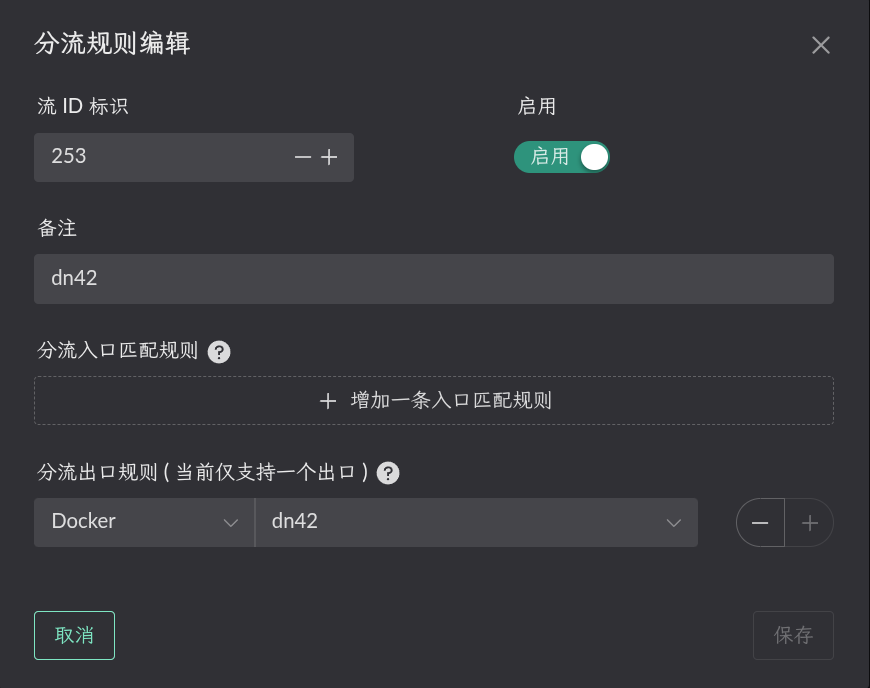
Configuring Full Cone NAT
First enable the Route LAN service on the bridge to which the container is attached, as shown below.

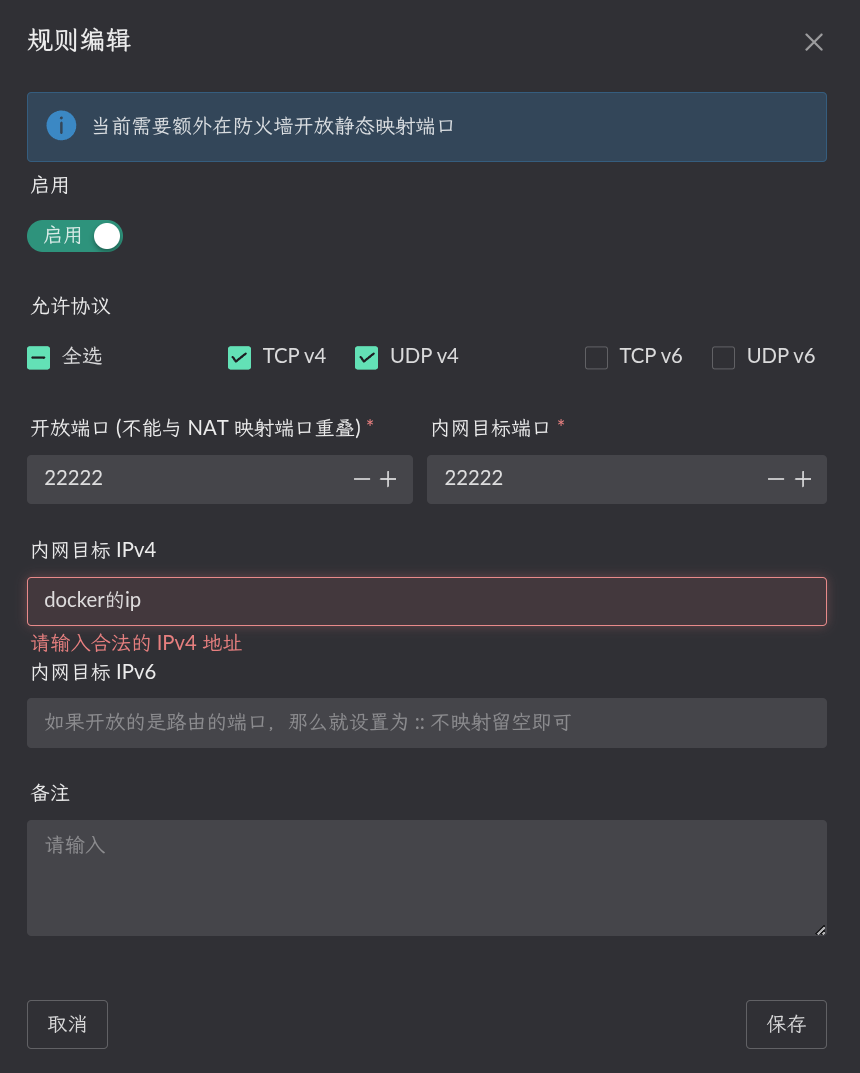
Static NAT configuration (the internal target port is the container's wg port, the IP is the container IP)
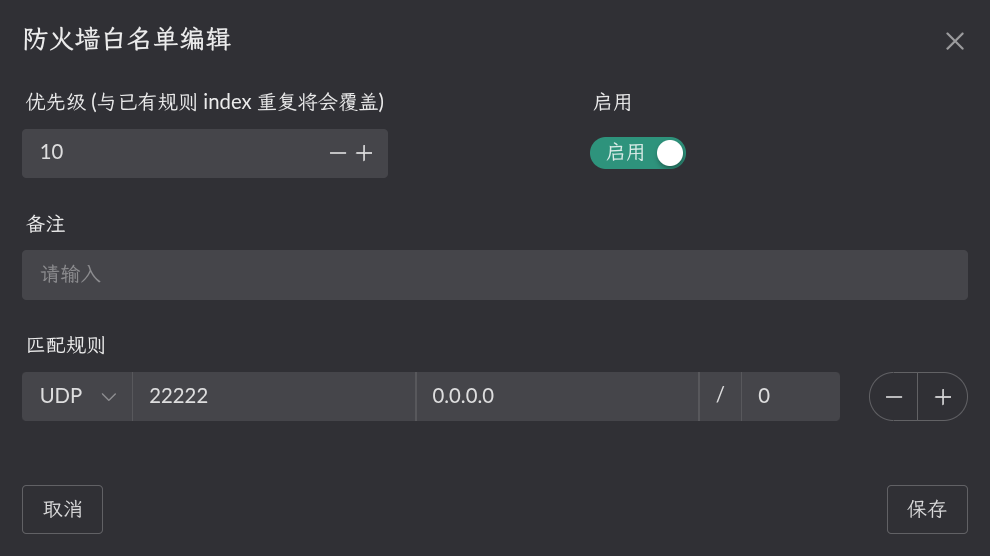
Open the matching port in the firewall
Configuring route rules
Click Destination IP on the relevant Flow to configure a rule. Only traffic matching that rule uses the Flow. 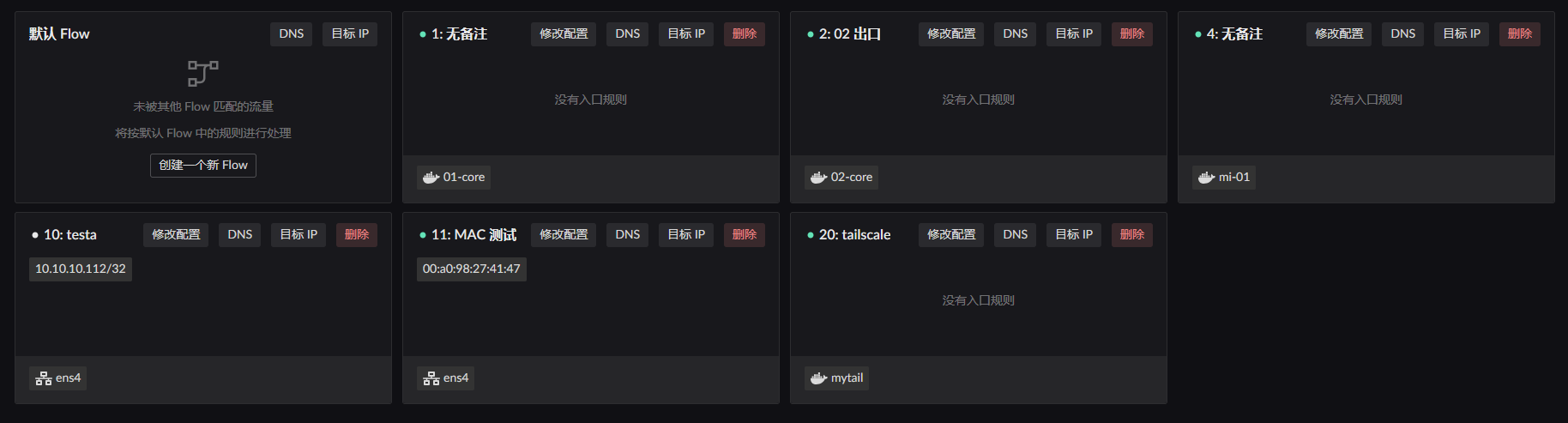
In this example, the LAN client with MAC address 00:a0:98:27:41:47 is governed by Flow 11. Configure Destination IP on Flow 11 and select Flow 253, the Flow created for the container, as the egress.
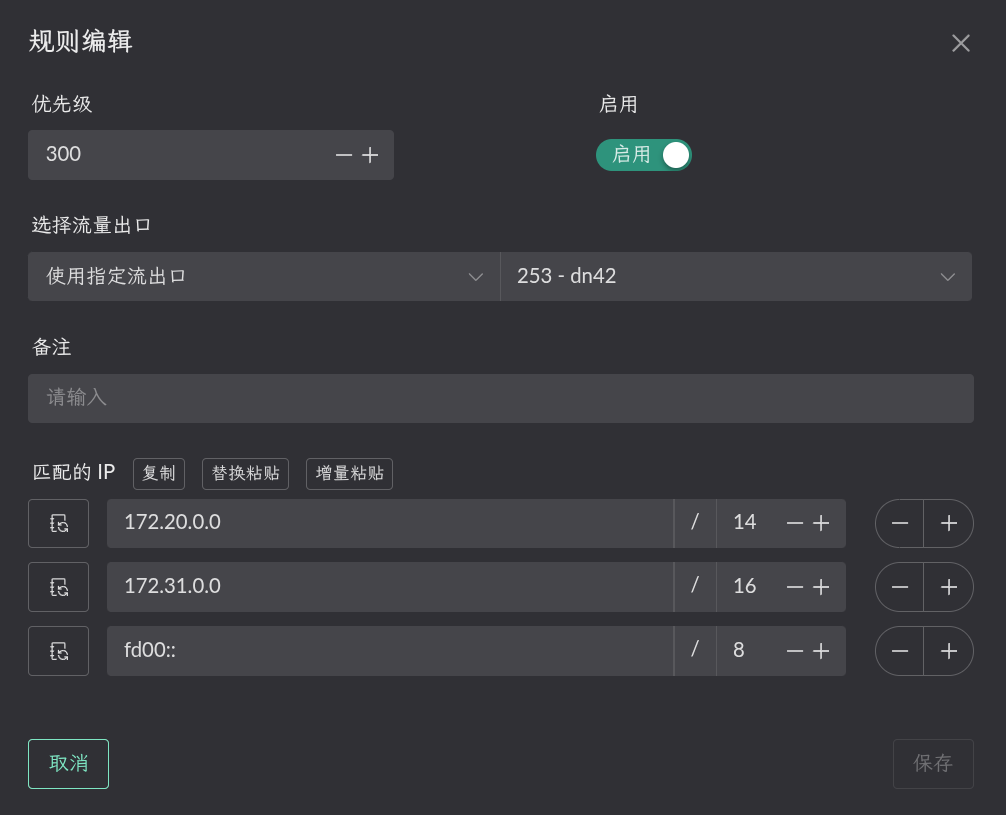
Traffic to a dn42 range then uses the Flow 253 egress and is forwarded into the dn42 container.
Configuring DNS
Under DNS -> Upstream DNS, click Create to add the DNS server for the dn42 network.
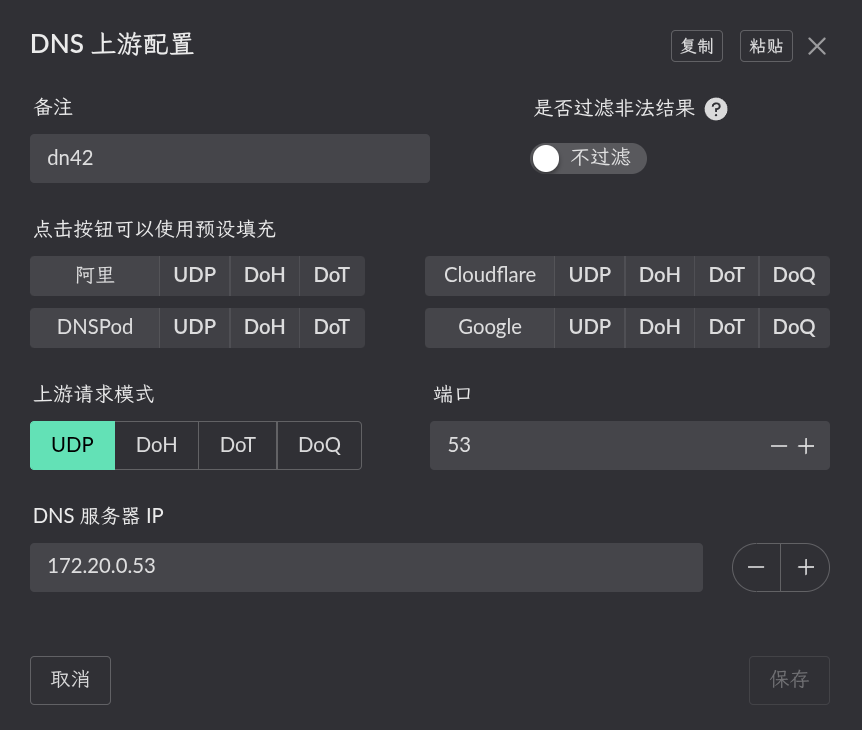
Return to Flow Settings and add a rule under DNS on Flow 11.
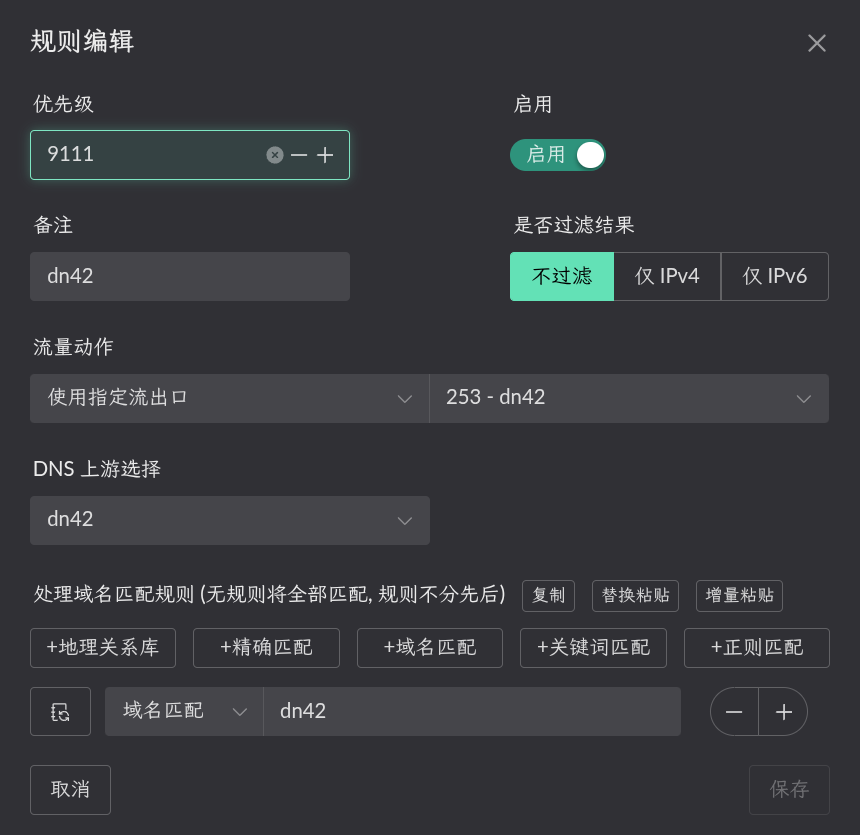
Queries for dn42 domains then use the Flow 253 egress and are forwarded into the dn42 container.