Traffic Shaping
Traffic Shaping groups clients into Flows and applies destination-based DNS, routing, and egress policies to their traffic.
Share feedback in GitHub Discussions.
Quick Navigation
- Basic Concepts - Understand core concepts like Flow, entry and exit
- Flow Definition - How to create and configure a Flow
- Destination Rules - DNS and IP rules in detail
- Rule Setting Location - Where to configure in the UI
- Docker Container as Flow Exit - Advanced usage
Basic Concepts
Core Terms
| Term | Description |
|---|---|
| Flow | A policy with entry rules, destination rules, and an exit |
| Entry | Rules that match clients by IP address or MAC address |
| Exit | A WAN interface or Docker container through which traffic leaves |
| Priority | The rule order; lower numeric values take precedence (range: 0 to 65535) |
Flow Types
Default Flow (Flow ID 0)
Traffic not matched by a custom Flow enters the default Flow. Its exit is the default route configured in the topology.
Example: enable Set as default route in the PPPoE configuration.
Custom Flows (Flow IDs 1-255)
Entry rules determine which clients use each custom Flow.
Rule Matching Mechanism
Matching logic
- Evaluate the DNS and IP rules.
- When more than one rule matches, use the rule with the lowest numeric priority.
- Stop evaluation after a rule is selected and apply its traffic action.
- Apply at most one destination rule to each packet.
WARNING
Priority conflicts: when a DNS rule and an IP rule have the same priority value, the DNS rule wins.
Flow Definition
Core Questions
Traffic shaping focuses on three questions:
- Who: which client does the traffic come from?
- Where: which exit should the traffic go out through?
- How: based on what (domain / IP) is the exit chosen?
Creating a Flow
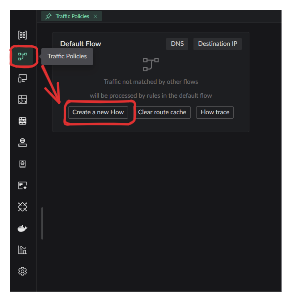
Click the button in the image below to create a new Flow:
This configuration window will pop up:
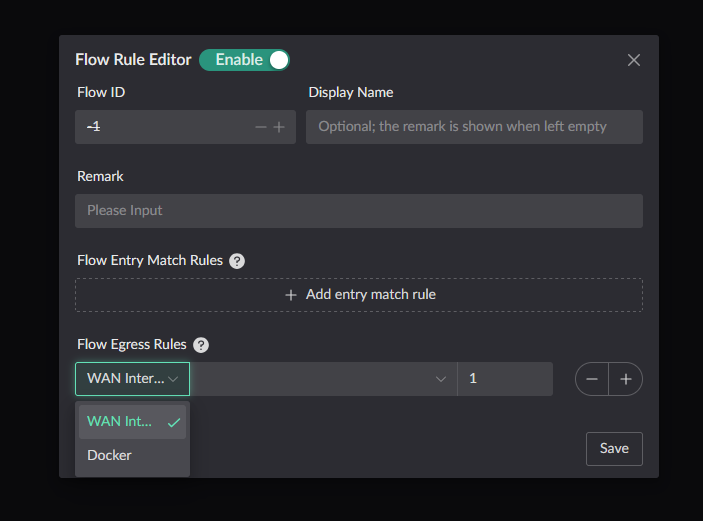
Entry and Exit Configuration
Entry defines which clients use this Flow.
Exit defines where traffic leaves when no destination rule selects another action.
INFO
Domain and IP rules can send selected traffic through a different exit.
Special Configuration Scenarios
Entry and exit are optional
Exit only (empty entry) Other Flows can use this Flow as an egress target, but no client enters it directly.
Entry only (empty exit) Traffic is dropped unless a rule selects another Flow's exit.
Neither configured The Flow can be used as a drop target for traffic forwarded by another Flow.
Destination Rules
DNS Rules
INFO
Each Flow has an independent DNS cache, so the same domain can have different cached answers in different Flows.
DNS Rule Components
Each DNS rule can define the following parts:
| Component | Description |
|---|---|
| Domain match | Which domain names trigger this rule |
| DNS upstream | Which upstream server resolves the domain |
| Traffic action | Which exit matched clients use when accessing this domain |
| Priority | When conflicting with an IP rule, which one wins (the smaller the value, the higher) |
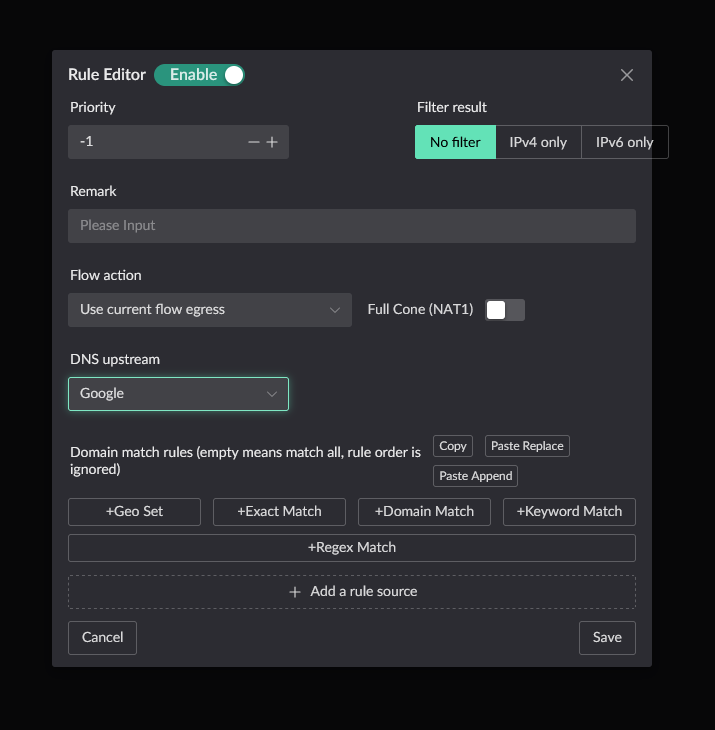
Fallback Rule
WARNING
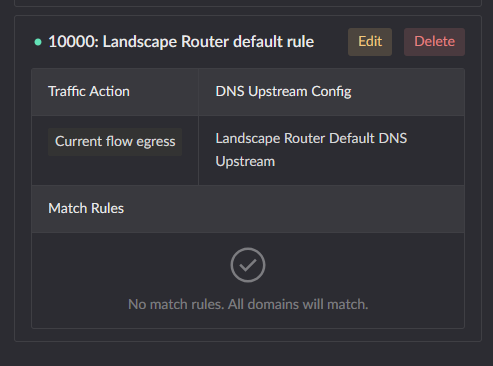
Each Flow should have a fallback DNS rule for domains that do not match a more specific rule.
Fallback rule example:
Target IP Rules
IP rules are similar to DNS rules, minus the "DNS upstream" part:
- ✅ Traffic action
- ✅ Priority
- ❌ DNS upstream (not needed)
Traffic Actions
Traffic actions are the core concept of a Flow, controlling the behavior of matched traffic.
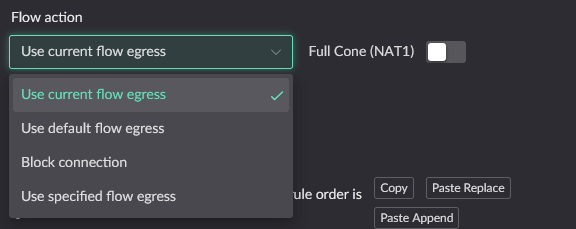
Action Types
| Action | Description |
|---|---|
| Current flow's exit | Use the default exit defined by the current Flow |
| Default flow's exit | Use the default flow's (Flow 0) exit |
| Block connection | Discard the packet |
| Use specified flow exit | Use the exit of another specified Flow |
Forwarding Example
Suppose there are Flow A and Flow B, and client C is configured to use B's exit when accessing website D:
┌─────────────────────────────── Flow A (default exit) ────────────────────────────────┐
│                                                                                       │
│   [C initiates access] ───► Determine: target == D ? ───► No ───► Use A exit to send  │
│                              │                                                        │
│                              │ Yes                                                    │
│                              ▼                                                        │
└────────────────────────────────────────────────────────────────────────────────────────┘
                               │
┌─────────────────────────────── Flow B (special exit) ─────────────────────────────────┐
│                               └──► Use B exit to send                                  │
└────────────────────────────────────────────────────────────────────────────────────────┘
Use cases
- C accesses website D → use B exit
- C accesses other websites → use A exit
Rule Setting Location
Default Flow (Flow 0) Destination Matching Rules
Access configuration through the DNS card in the upper right of the homepage:
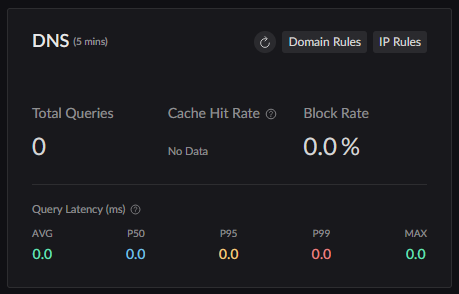
Custom Flows (IDs 1-255) Destination Matching Rules
Access configuration through Traffic Shaping Settings in the sidebar:
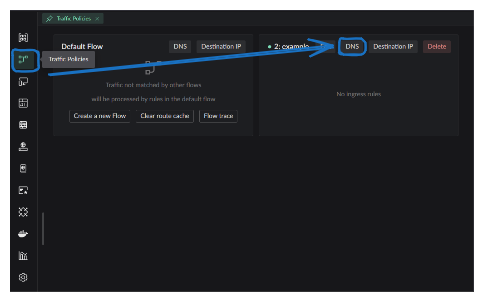
How to Use Docker Container as Flow Exit
Prerequisites
Two programs are needed:
Relay program (
redirect_pkg_handler) Download from ReleaseWorker program Can be any program: networking program, packet analysis program, etc.
DANGER
A container must include the relay program before it can be used as a Flow exit.
Using the Official Image
The project provides a reference image: landscape-edge.
Starting from the UI
In the UI's image-run dialog, enable Use as Flow exit:
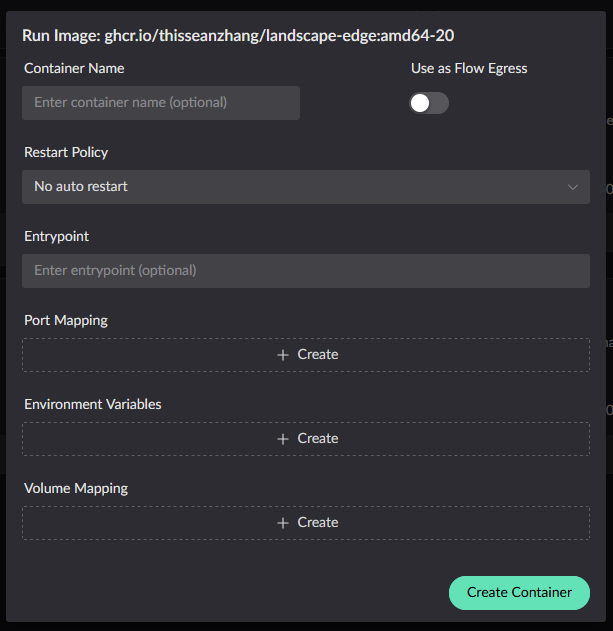
Starting from the CLI
Docker Run
# For lkit deployments, use /root/.lkit/landscape/data/unix_link/ as the host path.
docker run -d \
  --name your_service \
  --sysctl net.ipv4.conf.lo.accept_local=1 \
  --cap-add=NET_ADMIN \
  --cap-add=BPF \
  --cap-add=PERFMON \
  --privileged \
  -v /root/.landscape-router/unix_link/:/ld_unix_link/:ro \
  ghcr.io/thisseanzhang/landscape-edge:amd64-xx # replace xx with the image version
Docker Compose
services:
  your_service:
    image: ghcr.io/thisseanzhang/landscape-edge:amd64-xx # replace xx with the image version
    sysctls:
      - net.ipv4.conf.lo.accept_local=1
    cap_add:
      - NET_ADMIN
      - BPF
      - PERFMON
    privileged: true
    volumes:
      # For lkit deployments, use /root/.lkit/landscape/data/unix_link/ as the host path.
      - /root/.landscape-router/unix_link/:/ld_unix_link/:ro # Required mapping
      # Mount the worker program and its startup files under /app/server.
Worker Program
The image bundles a demo worker program:
- Location:
/app/server - Function: creates a TProxy listening on port
12345 - Relay program location:
/app/redirect_pkg_handler - Default forwarding port:
12345(changeable via the environment variableLAND_PROXY_SERVER_PORT)
Custom Worker Program
Replacing the Worker Program
Mount your worker program to the /app/server directory:
Local directory structure:
/xx/flow/
├── config.json
├── run.sh          # Startup script
└── server          # Your worker program
Mapping to the container:
volumes:
  - /xx/flow:/app/server
When the container starts, /app/server/run.sh will be executed automatically.
TIP
The reference image already includes the relay program.
Custom Image Integration
To integrate the relay program into an existing image:
Download the relay program Get
redirect_pkg_handlerfrom ReleaseConfigure the startup script
#!/bin/bash

# Configure routing table
ip rule add fwmark 0x1/0x1 lookup 100
ip route add local default dev lo table 100

# Start the worker program
/app/server/run.sh /app/server &

# Start the relay program
/app/redirect_pkg_handler &

wait
Relay Program Parameters
Every argument of redirect_pkg_handler has a corresponding environment variable:
| Argument | Environment variable | Default | Description |
|---|---|---|---|
-s, --saddr | LAND_PROXY_SERVER_ADDR | 0.0.0.0 | Worker program IPv4 listen address |
--saddr6 | LAND_PROXY_SERVER_ADDR_V6 | :: | Worker program IPv6 listen address |
-p, --sport | LAND_PROXY_SERVER_PORT | 12345 | Worker program listen port |
-m, --mode | LAND_PROXY_HANDLE_MODE | tproxy | tproxy / route / multiple_tproxy |
--enable-icmp-passthrough | LAND_PROXY_ENABLE_ICMP_PASSTHROUGH | false | See ICMP passthrough below |
--icmp-mark-value | LAND_PROXY_ICMP_MARK_VALUE | 2 | The mark applied when ICMP passes through |
--sock_path | LAND_SOCK_PATH | - | Unix socket path for registration |
--log-level | LAND_REDIRECT_LOG_LEVEL | INFO | Log level |
ICMP Passthrough
The TProxy mechanism handles only TCP and UDP. The relay program drops incoming ICMP packets by default, so ping does not work on paths routed through a Flow exit container. This is the expected default behavior.
After enabling --enable-icmp-passthrough, ICMP packets are marked with --icmp-mark-value and handed over to the local protocol stack, so ping works.
Enabling the flag alone is not enough
Passthrough only prevents packets from being dropped; outbound traffic still needs forwarding and NAT configured inside the container, and the mark must match --icmp-mark-value:
echo 1 > /proc/sys/net/ipv4/ip_forward
echo 1 > /proc/sys/net/ipv6/conf/all/forwarding
iptables  -t nat -A POSTROUTING -m mark --mark 0x2/0x2 -j MASQUERADE
ip6tables -t nat -A POSTROUTING -m mark --mark 0x2/0x2 -j MASQUERADE
The official image's start.sh already contains these lines but they are commented out by default. Uncomment them when needed, or put them in your own /app/server/run.sh.